Download Air Defense Command free on android
APK file Air Defense Command 1.3.8How to install APK / APKS / OBB file on Android
Last checked date: October 1, 2026
Short info
In general apk file Air Defense Command has rating is 7.9 from 10. This is cumulative rating, most best apps on google play store have rating 8 from 10. Total reviews in google play store 5496. Total number of five star reviews received 3405. This app has been rated like bad by 931 number of users. Estimated number of downloads range between 500,000+ downloads in google play store Air Defense Command located in category Arcade, with tags tower defense and has been developed by Ensit Media. You can visit their website not exists or send ensitmedia@gmail.com to them. Air Defense Command can be installed on android devices with 4.0(Ice Cream Sandwich )+. We provide only original apk files. If any of materials on this site violates your rights, report us You could also download apk of Google and run it using android emulators such as big nox app player, bluestacks and koplayer. You could also download apk of Air Defense Command and run it on android emulators like bluestacks or koplayer. Versions of Air Defense Command apk available on our site: 1.3.8, 1.3.7, 1.3.5, 1.3.3, 1.3.2 and others. Last version of Air Defense Command is 1.3.8 was uploaded 2026/01/10
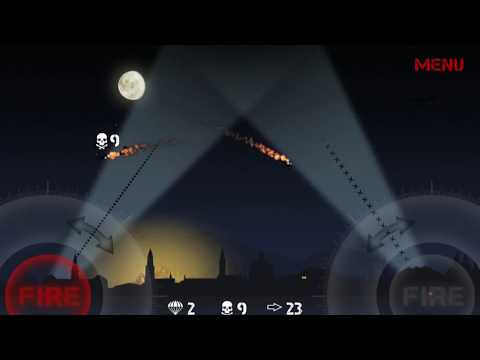
Screenshots of Air Defense Command

Description of Air Defense Command (from google play)
The Alliance is the most powerful military force in the world
They have declared war on us
We cannot win...
... but we must fight!
Engage in a desperate struggle to defend your tiny country against overwhelming odds. Shoot down enemy bombers and exact a heavy price on the enemy's air force.
Version history Air Defense Command
New in Air Defense Command 1.3.8
Maintenance update and bug fixesAdvertisement
Please rate this app
More info
- LicenseFree
- File nameAir Defense Command
- File Version1.3.8
- Package namecom.axfn.airdefensecommand.android
- Size37.11 MB
- UploadedOctober 1, 2026
- Android7.0 or later

- CategoryArcade
- DeveloperEnsit Media
- Developer emailensitmedia@gmail.com
- md5 hashad5c67194ffe8d9a13f711412cee036f
- Architecture-
- Permissionsshow (8)
